Consuming XML Web services in Backbone.js using Jath
Update: This article is getting a lot of traffic lately so I want to draw attention to a discussion in the comments. Backbone no longer requires the patch that I have described below to work with XML. However the use of Jath to parse the results remains the same. Check out this article via the backlinks.
Over at Ubernote We recently released an initial version of our API for public consumption. Internally, all of our code uses SOAP/XML over the wire, so it made the most sense for us to release our public API using the same protocol. For some developers, SOAP is easy to deal with using proxy-generation tools — you’ll never have to deal with the data format at all, just native method calls in Java/C#/etc. We’ll probably be adding support for JSON natively at some point if there is sufficient developer interest in the API, but for now it is XML-only.
However, for HTML5 clients and some mobile application frameworks, JSON is the only way to do things. I’ve been playing with a the Underscore.js/Backbone.js/jQuery Mobile stack recently and I wanted to hook all that HTML5 goodness up to our newly-minted API.
Followers of my blog may recall a project that I created almost a year ago called Jath, which is an XML-to-JSON conversion library that works in the browser (and now in Node.js also). My plan to get all this working was to hook into the persistence layer of Backbone.js and convert the XML coming back from the Ubernote API to JSON before it hit the client-side data models.
Backbone.js was designed to be very flexible in dealing with data coming back from the server, so there is a hook for doing data manipulation before it hits the data models. However, it does not support fetching XML data out of the box. Since it uses jQuery under the hood the capability is there, it is just set for the common case which is JSON. To enable support for XML we only need to change two lines in the Backbone.js source. See the following code from the Backbone sources where we set dataType and contentType to their XML counterparts:
 Backbone.sync = function(method, model, options) {
 var type = methodMap[method];

 // Default JSON-request options.
 var params = _.extend({
 type: type,
 contentType: 'application/xml',
 dataType: 'xml',
 processData: false
 }, options);
Once this change is made we can call fetch() on a Backbone model and call an XML Web service.
Returning XML isn’t going to be useful unless we can convert it to JSON before it gets consumed by the models. We provide a function called ‘parse’ when creating a Backbone collection to perform the conversion. When data is fetched it will pass through this function on its way into the data models. The following code snippet creates a Backbone model for an Ubernote note and a collection to store a list of notes. It also performs the data conversion using Jath. This can all be done in something like 20 LOC since Jath templates are very concise:
			var Note = Backbone.Model.extend({});
			var NoteStore = Backbone.Collection.extend({
				model: Note,
				url: 'http://www.ubernote.com/API/V0_1/service.asmx/NotesGetList?sessionID=ABDF9A07-CB44-4231-8921-AC6D178C1F5F&sort=1&startRow=0&maxRows=10',
				parse: function( response ) {
					var parsed = Jath.parse(
						[ '//notes', {
							id: 'Note_ID',
							title: 'Title',
							body: 'Body',
							summary: 'Summary',
							sourceType: 'Source_Type',
	 						createDT: 'Create_Dt',
							updateDT: 'Update_Dt',
							shareLevel: 'Share_Level',
							noteType: 'Note_Type',
							star: 'Star',
							accessedDT: 'Accessed_Dt'
					} ], response );
					return parsed;
				}
			});
Note that I have the URL parameters including the session ID pre-configured, as I haven’t written a login page or any support functions for this code since it is intended to be an exploration/proof-of-concept only.
Once the model is set up all we have to do is create an instance of it and call fetch() to populate it:
var notes = new NoteStore();
notes.fetch();
Here is what the result looks like when the model is rendered using jQuery Mobile as the view UI:
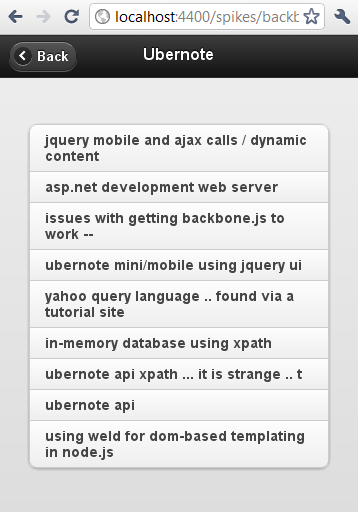
I won’t go into the UI aspects of this but I’ll probably cover some other related topics in a future series of posts. But for now this should show you that it is possible and not too difficult to use the current crop of HTML5/Javascript frameworks with XML Web services.